
Vidocu : Turn recordings into videos and docs


Vidocu: in summary
Vidocu is an AI-based platform that converts screen recordings into professional-grade videos, screenshots, and SEO-optimized documentation in minutes. Designed for SaaS companies, product teams, and fast-scaling startups, Vidocu eliminates the need for manual editing, transcription, and content production, allowing teams to focus on product development instead of maintaining user-facing content.
By uploading a simple screen recording, teams can instantly generate:
Clean subtitled videos with natural AI voiceovers,
Context-aware screenshots of key moments,
Structured, reusable product documentation ready for onboarding, support, or knowledge bases.
Vidocu automates content workflows for customer education, internal training, and self-serve support, making it easier to keep up with product changes without increasing team workload.
What are the key features of Vidocu?
Automatic subtitle generation and AI voice narration
Vidocu uses AI to analyze the uploaded screen recording and generate accurate subtitles and natural-sounding voiceovers without manual input.
Key capabilities:
Precise subtitle timing based on UI actions and speech,
Voice narration in multiple languages and tones,
Option to select different AI voices depending on brand voice or audience,
Accessibility-compliant subtitle formatting.
This removes the need to manually transcribe content or record audio, significantly speeding up video production.
Smart screenshot extraction
Vidocu identifies key moments within the screen recording and captures relevant, high-resolution screenshots automatically.
Screenshot logic includes:
Detection of user interface changes and important click points,
Clean image cropping for visual clarity,
Screenshots tied to timestamps for easy reference in docs.
This feature helps generate visual step-by-step guides without having to pause the recording or manually export stills.
Structured documentation from video content
Vidocu transforms video content into structured documentation, suitable for help centers, internal wikis, and onboarding flows.
Documentation features:
Headings and sections based on the flow of the recording,
Automatic description of each step with associated screenshots,
SEO-friendly formatting and metadata tagging,
Export to HTML, Markdown, or direct CMS integration.
This converts a single recording into a multi-format documentation package, reducing duplication of effort across teams.
Reusable, scalable content for product teams
Built for agile teams, Vidocu allows organizations to rapidly update and redeploy content when products evolve.
Benefits include:
Fast turnaround for documentation after product updates,
Easy duplication of videos and docs across different platforms or audiences,
Version control to track content evolution over time.
This helps reduce the friction between product iterations and documentation workflows.
Ideal for support, onboarding, and training content
Vidocu supports a variety of use cases with a single workflow:
Help centers: Create how-to articles and troubleshooting steps from internal demos.
User onboarding: Generate guided walkthroughs without hiring voice talent or video editors.
Internal training: Build instructional content for teams using the product or tools.
Release notes: Provide clear visual explanations of product updates.
With Vidocu, one screen recording becomes a set of reusable, multi-format resources.
To summarize
Vidocu transforms the way product and support teams create educational content by automating the production of videos, screenshots, and documentation from simple screen recordings. Its key benefits include:
Elimination of repetitive tasks like manual transcription, narration, and editing,
High-quality visual and written content from a single source of truth,
Structured documentation ready for help centers and SEO,
Scalable workflows for teams shipping frequent product changes,
Support for multilingual and accessible content at no extra cost.
Vidocu is a powerful solution for teams looking to automate content creation, maintain up-to-date resources, and support their users more effectively, with minimal effort.
Its benefits
Video-to-Documentation AI
Subtitles & Voiceovers
Auto Screenshots
SEO-Optimized Articles
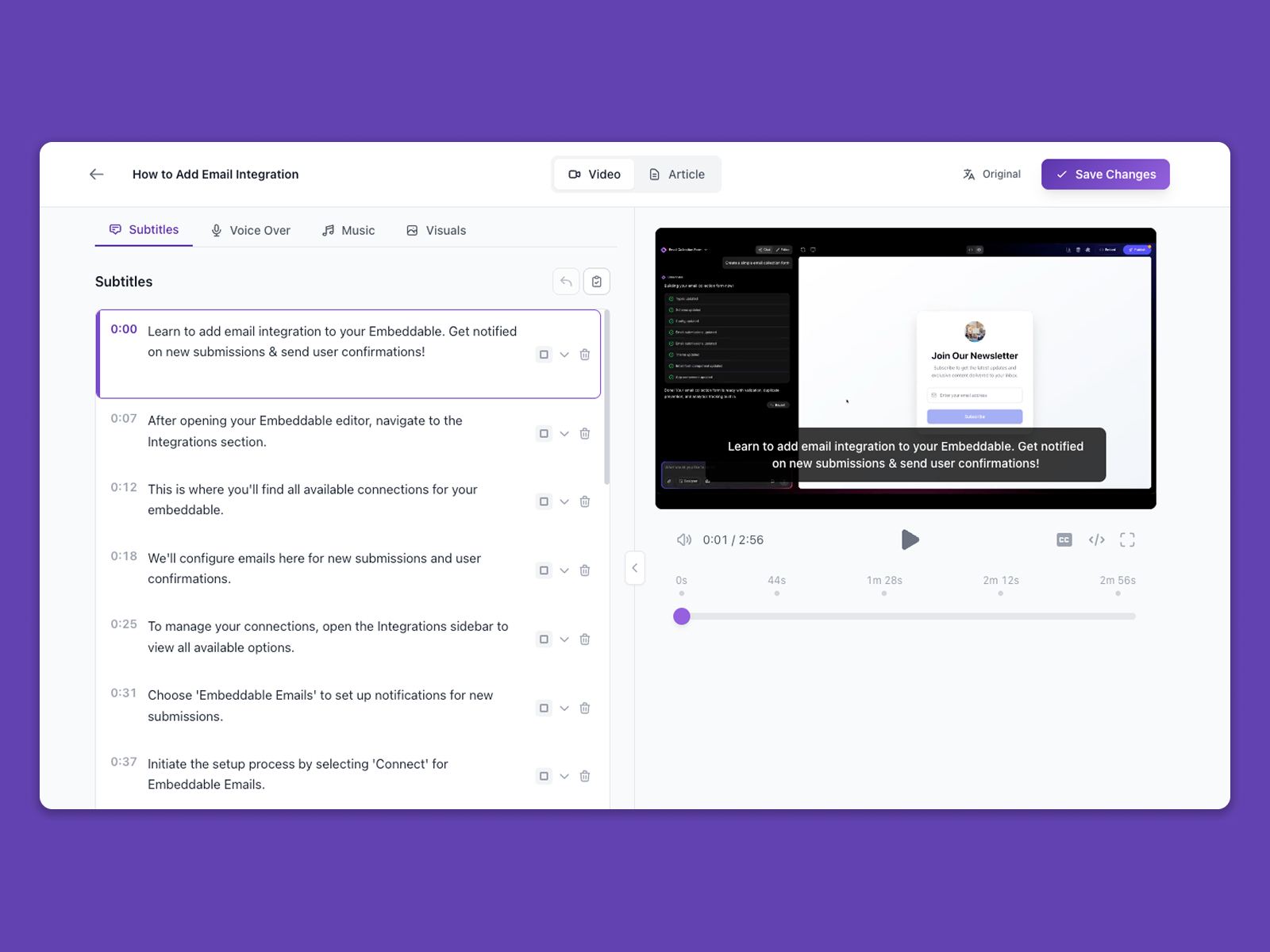 Vidocu - Vidocu Demo
 Vidocu: its rates
standard
$40.00
/month /unlimited users
Clients alternatives to Vidocu

Create stunning videos effortlessly with this video editing software.
See more details See less details
With a user-friendly interface and a wide range of tools, this software allows you to edit videos easily and quickly. Add text, music, and effects to make your videos stand out. Perfect for businesses and individuals looking to create professional-looking videos.
Read our analysis about Pitchy
Powerful video editing tool with extensive features for creating professional-level videos.
See more details See less details
Packed with advanced editing tools, Pexels offers a range of features such as color correction, audio mixing, and text overlays to help you create stunning videos. With its user-friendly interface and intuitive controls, you can easily edit and export your videos in various formats.
Read our analysis about Pexels
Create stunning videos with ease using this intuitive video editing software.
See more details See less details
Whether you're a beginner or a pro, you'll love the powerful features such as drag-and-drop editing, customizable templates, and a vast library of high-quality media assets. Plus, its cloud-based platform allows for easy collaboration and sharing.
Read our analysis about Pixabay Appvizer Community Reviews (0) The reviews left on Appvizer are verified by our team to ensure the authenticity of their submitters.
Write a review No reviews, be the first to submit yours.